Tuesday, 16 July 2013

Microsoft Asks Attorney General To Release Gag Order On NSA Spying


Microsoft is tired of getting pummeled in the press over reports that it hands over emails and Skype conversations to the National Security Agency. Unfortunately, the federal gag order related to the NSA is so strict that companies can’t even talk about the existence of the program. Today, Microsoft begged issued a strongly worded letter to Attorney General Eric Holder to release the gag order so that that they can dispel rumors.
“I’m writing to ask you to get involved personally in assessing the Constitutional issues raised by Microsoft and other companies that have repeatedly asked to share publicly more complete information about how we handle national security requests for customer information.”
The letter followed a categorical denial that Microsoft provides special access to the NSA. “We do not provide any government with the ability to break the encryption, nor do we provide the government with the encryption keys,” tweeted Microsoft General Counsel, Brad Smith.
Yahoo recently won a court case that will allow it to prove that they fought the NSA, so there’s room for Microsoft to be optimistic.
The full letter has been pasted below:
Dear Attorney General Holder:
I’m writing to ask you to get involved personally in assessing the Constitutional issues raised by Microsoft and other companies that have repeatedly asked to share publicly more complete information about how we handle national security requests for customer information. In my opinion, these issues are languishing amidst discussions among multiple parts of the Government, the Constitution itself is suffering, and it will take the personal involvement of you or the President to set things right.
Since the initial leak of NSA documents, Microsoft has engaged constructively with the Department of Justice,the FBI, and other members of the Intelligence Community on the ground rules governing our ability to addressthese issues and the leaked documents publicly. We have appreciated the good faith in which the Government hasdealt with us during this challenging period. But we’re not making adequate progress. When the Department andFBI denied our requests to share more information, we went to the Foreign Intelligence Surveillance Court (FISC)on June 19 to seek relief. Almost a month later, the Government is still considering its response to our motion.
Last week we requested official permission to publicly explain practices that are the subject of newly-leaked documents that refer to Microsoft and have now been misinterpreted in news stories around the world. Thisrequest was rejected. While we understand that various government agencies are trying to reach a decision onthese issues, this has been the response for weeks. In the meantime, the practical result of this indecision iscontinued refusals to allow us to share more information with the public.
This opposition and these delays are serving poorly the public, the Government itself, and most importantly, the Constitutional principles that we all put first and foremost.
As I know you appreciate, the Constitution guarantees the fundamental freedom to engage in free expressionunless silence is required by a narrowly tailored, compelling Government interest. It’s time to face some obvious facts. Numerous documents are now in the public domain. As a result, there is no longer a compelling Government interest in stopping those of us with knowledge from sharing more information, especially when this information is likely to help allay public concerns.
I feel very fortunate that we have both an Attorney General and a President with such long standing knowledge of and appreciation for our Constitution. Put simply, we need you to step in to ensure that common sense and our Constitutional safeguards prevail.Thank you for your consideration.
Sincerely,
Bradford L. Smith

Bitcoin Transactions Rise As Economic Unrest Hits Argentina


top-50-download-change
Bitcoin has created an interesting solution for problematic economies. Because it allows seamless extraction of wealth out of a bank account and into the cloud, Argentinians have been ramping up usage of the cryptocurrency in an effort to stem the effects of their worsening economy and their choice to go BTC is actually moving the market slightly.
Even as BTC penetration in other countries remains flat or down, Argentina’s portion of Bitcoin downloads has risen from 1% of the whole to 3% and interest in the currency is at an all time high. According to The Genesis Block, the country’s first Bitcoin meetup group started in 2008 with eight members and is now up in the 400 member range.
The post goes into the economic details of the move towards Bitcoin but in short, the Argentinian government fined a group of economists for recalculating inflation to much higher levels than the official party line. In addition, dollars are being used as an alternative currency thanks to a weak peso and the potential for capital controls like those happening in Cyprus. Argentinians just want to get their money out of banks and, to that end, they’re trusting variable BTCs over their own currency.
In all financial reporting there is always a bit of if-then conjecture. However, the rise in interest in Bitcoin in this part of the world connects to some real world political choices. It’s a fascinating example of how the currency is taking on a life of its own and, more importantly, becoming a viable investment alternative.

With Its $5 Billion Share Buyback Program, Yahoo Still Has A Big Pile Of Cash For Acquisitions


marissa Mayer I Must Have It
Yahoo just released its mixed Q2 earnings, and a few sentences may have given the answer everyone was waiting for — yes, Yahoo still has plenty of cash to pursue more acquisitions. Evidence of this lies in the company’s share buyback program. “During the second quarter of 2013 Yahoo repurchased 25 million shares for $653 million,” one can read in the release. Those are part of a bigger $5 billion program. These shares can be reissued and sold for cold cash any day.
Back in September 2012, Marissa Mayer decided to sell 40 percent of Yahoo’s stake in Alibaba for $7.6 billion. $3.65 billion was set aside to reinvest in Yahoo shares, proving that the company is confident in its own future.
“We are happy to announce that as of today we have essentially completed our commitment to return $3.65 billion from our Alibaba Group proceeds to shareholders, repurchasing a total of 190 million shares,” wrote CFO Ken Goldman in today’s earnings release.
But the company will now go even further. It has a $5 billion share buyback authorization with the SEC and it plans to use this authorization in full. In other words, reports of the disappearance of Yahoo’s cash after the $1.1 billion Tumblr acquisition have been greatly exagerated.
For those who are not familiar with a stock buyback program, the stock can either be canceled or reissued at a later date. In case it is reissued it is a big win for the company because existing shares are not diluted and the new shares just keep the same stock number, just like nothing happened.
They are other advantages as well. For example, it shows that Yahoo if very confident, saying more or less that there is no better investment than its own stock. It slightly raises the price of existing shares as there are less outstanding shares.
Screen Shot 2013-07-16 at 11.17.03 PM
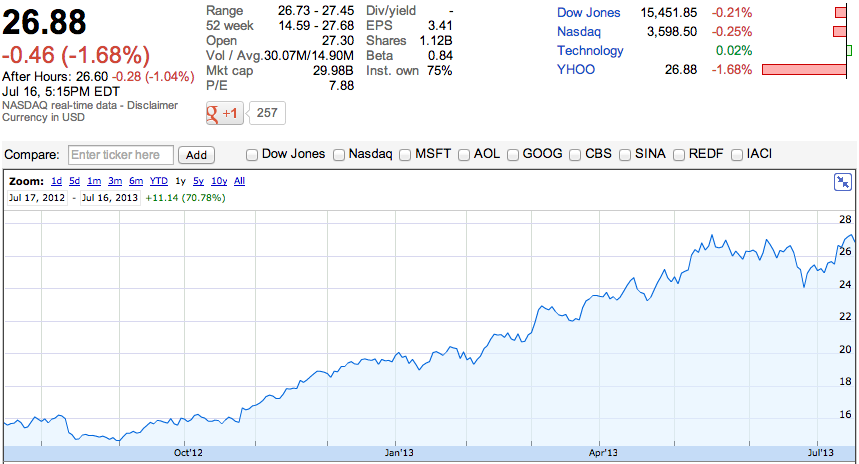
For the past twelve months, Yahoo shares have been doing very well. With a share price of 15.65 on July 16, 2012, today’s price of 26.88 represents an incredible 71.8 percent increase in just a year. That’s better than Google, Apple or eBay.
Yahoo’s share buyback program has paid off so far and the company could spend more than $3.65 billion in acquisitions, because the value of its portfolio is worth more today. As long as the stock goes up, it’s a good strategy.
So today’s earnings taught entrepreneurs and VCs one thing: the acquisition spree can continue.

Google Opens The New Google Maps For Web To Everyone


Screen Shot 2013-07-16 at 2.43.51 PM
Remember that shiny new Maps web interface that Google started showing off at I/O back in May? It’s here!
Technically, the new Maps interface has actually been here for a while… assuming you signed up for an invite shortly after it was announced and were able to make it through Google’s invite queue before they opened the floodgates today. (I signed up a few hours after the announcement and just got my invite a week or two ago.)
Need a refresher on what’s new? Here’s the bulk of it:
  • A new, fullscreen interface
  • Maps now uses vector data rather than graphical tiles for faster loading and handling
  • You can now zoom way, way out. As in, out into space. They’ve built in a Google Earth-esque planetary view, assuming you’re on a beefy enough computer running a compatible browser (Chrome or Firefox)
  • Photo Tours that let you explore famous locations through a series of stitched-together, user-submitted photos. It’s more trippy than it is useful, but it’s still worth checking out. (To see one, go to a major city [like San Francisco] and click the little expansion arrows in the very bottom right)
  • Most routes will automatically show public transport alternatives alongside your driving options
  • Quick comparison charts for public-transport options, graphing the difference in stops/overall time
But wait! Don’t head straight over to maps.google.come and expect the new look just yet. While they’ve ditched the invite queue and the whole having-to-wait bit, you’ll still need to opt in. To do so, just go to this page, scroll down to the bottom, and hit the “Try Now” button. It should let you in immediately.

Marissa Mayer Says Yahoo Has 340M Monthly Users On Mobile, Promises To Improve Display Ads, Video

 s
marissa mayer
One of the big themes that CEO Marissa Mayer kept returning to during the webcast discussingYahoo’s second-quarter earnings was mobile.
“Yahoo’s future is mobile,” she said, noting that the company now sees 340 million monthly mobile users. She didn’t offer any earlier mobile traffic numbers to illustrate growth, but to show the company’s commitment in this area, she said that the mobile team has grown by 6x. Many of those new team members have joined Yahoo through what Mayer called “tuck-in or talent acquisitions,” and she said we can expect those deals to continue at a similar pace.
The webcast actually kicked off with a discussion of the growth that Yahoo has seen with a number of new products, many of them mobile. For example, the number of daily active users to Yahoo Mail on mobile has increased 120 percent since the launch of the tablet app. And since launching the new Yahoo app enhanced by Summly, daily users have increased 55 percent and time spent has increased 60 percent. (One reason to highlight traffic growth: Offsetting the disappointment in the quarter’s flat revenue.)
Overall, Mayer said Yahoo’s traffic (as measured in pageviews) actually grew year-over-year — that might not sound particularly impressive, except that it reflects recent growth offsetting earlier losses. Mobile, she said, is “still early” but also “growing quickly.”
Mayer pointed to mobile as one of four key areas for Yahoo’s future growth. The others are search, display advertising and video, and the last two areas are ones that the company “will begin to clearly address” in the second half of the year, she said.
On display, Mayer acknowledged that Yahoo has “felt some negative impact,” particularly from the growth of programmatic ad buying. She said the company has been making progress with “early efforts” in areas like new ad formats, but later, one of the analysts asked whether the programmatic trend is going to continue driving ad rates down. Mayer argued that these technologies provide “an opportunity to do a much better job to match the right users to the right advertisements,” which could result in ads sold at premium rates.
Mayer also mentioned Yahoo’s Tumblr acquisition, which she said presents opportunities across all four areas. For one thing, she said, she’s working with Tumblr’s David Karp to develop native ads, which she said “can be every bit as good as the content itself.”

Path Is Raising $50M At A $500M Valuation, Still Looking For A Lead Investor


path-500m
Path is raising a $50 million Series C round at a $500 million post-money valuation. Sources tell us the company is still seeking a lead investor, the round is currently oversubscribed, and one of the investors in the round is “a strategic private investment group in Asia.”
Last April, the social network founded by ex-Facebooker Dave Morin raised $30 million at a $250 million valuation.
We’ve also heard rumors that Path has been in acquisition talks with several industry giants. Google, which offered over $100 million to acquire Path in 2011, was the name that came up the most, but sources have said those rumors are false.
This contradicts an earlier report from us that said the company was raising at a valuation as high as $1 billion. Sources say that Path was never raising at a valuation as high as $1 billion, but is still having some difficulty with this Series C.
On the one hand, it’s hard to read too much into investors passing on Path, as that is commonplace in funding rounds. And yet, the timing of the round can’t be great for Path, as it comes at a difficult time in general to be raising, and right on the heels of controversy over the company’s methods for acquiring users, and amid speculation about the company’s userbase.
Onavo Insights tells us that while millions have downloaded the app, active users are declining, at least in the U.S. In June, 1.9 percent of U.S. iPhone users actively used the app, which is down 24 percent from 2.5 percent of users in May.
Additional reporting by Alexia Tsotsis and Kim-Mai Cutler.

TC Cribs: A Trip To Houzz, The Startup HQ That Feels Like Home


Welcome back for a brand spankin’ new episode of Cribs, the TechCrunch TV show that knocks on the front doors of some of the tech industry’s hottest companies to take a look inside their offices.
This time, we headed about 30 miles south of San Francisco to the leafy, sunny, startup-happy paradise that is Palo Alto, California. There we visited Houzz, the startup that brings inspirational home design ideas to the web. Given Houzz’s focus, we expected to find a nice-looking office — and we certainly weren’t disappointed.
Check out the video embedded above to see Houzz’s homey family photos, bustling working area, and the cocoon you can go to if you want to escape it all (with beautiful classical piano music included.)

Incredible Labs, Maker Of Personal Assistant App Donna, Cuts 25% Of Staff After Launch


donna
Incredible Labs, the startup that built personal assistant app Donna, reduced headcount by about 25 percent this week, as it seeks to streamline operations and improve its balance sheet. The layoffs came just a few weeks after Incredible Labs finally released its app to the public.
We’ve written about Donna a fair amount since launch, but it’s important to note that the app came out after about a year of flying under the radar. When Donna launched, it did so amid a wave of personal assistant and smart calendar apps hitting the market.
The company had raised a total of $2.5 million in seed funding from a group of investors that includes Khosla Ventures, Betaworks, Maynard Webb, CrunchFund, Ashton Kutcher, and some other angels. But the competitive landscape has shifted a bit since the team first started working on the product. Most recently, two of its competitors in the smart calendar space just raised new funding.
New York City-based Sunrise raised $2.2 million from Mike Hirshland from Resolute.vc and Rob Go from NextView Ventures, along with investors like Lerer Ventures, SV Angel, BoxGroup, 500 Startups, and John Maloney from Terrapinbale. Tempo, the smart calendar app incubated at SRI, raised $10 million led by Relay Ventures and Sierra Ventures.
But since the launch, Incredible Labs has decided to refocus its efforts and streamline its operations. CEO Kevin Cheng sent the following statement when asked about the cause of the layoffs:
“With the launch, we now have a clear understanding of what areas to focus on and what our needs are to execute on our vision. Unfortunately, that clarity also means some very talented members of our team didn’t quite fit our immediate needs and had to be let go.”
The founding team is still intact, according to Cheng, and at the end of the day only three people were let go. Still, for an early-stage company, losing a few of its members can be difficult going forward.
Disclosure: CrunchFund was founded by Michael Arrington, who also founded this website, which pays me. That doesn’t mean CrunchFund pays me.

The Granddaddy Of Messaging Apps, WhatsApp, Finally Goes For A Subscription Model on iOS


whatsapp
While messaging has become a veritable war with apps like Line, KakaoTalk, WeChat, Path and Facebook Messenger across Asia and Western markets, there’s been one longstanding app that’s presided over the space with very few apparent changes.
WhatsApp, the Sequoia-backed messaging app that dominates in Europe and that is often tipped as an attractive acquisition candidate for companies like Google and Facebook, just went freemium finally on iOS. The app has been paid for years on the iPhone at a $0.99 price point.
But today it went free with an annual subscription fee of $1 after the first year. This isn’t really a surprise as CEO Jam Koum talked about this several months ago. It brings WhatsApp’s business model on iOS in line with other platforms like Android, BlackBerry, Nokia and Windows Phone.
The paid app business model is really a vestige of an older era when developers would sell their work up-front. But over time, many paid apps have made the switch toward going free with paid features. Games really triggered this wave, but other high-usage apps like messaging have gone for a freemium strategy.
Japan’s Line, for example, made $58.9 million in the first quarter of this year in Japan through in-app purchases and sales of stickers — which apps like Path and Facebook Messenger have subsequently copied.
WhatsApp launched back in 2009 and quickly grew popular in markets where SMS pricing made messaging through smartphone apps cheaper. It really dominates in European markets and has a strong foothold in India, as well.
Recently, the company said it was bigger than Twitter with more than 200 million monthly actives,10 billion messages sent and 17 billion received in a single day.

Zynga’s Former Chief Game Designer Takes Strategic Investment From Nexon For SecretNewCo


brian-reynolds
Back in January, Zynga’s chief game designer Brian Reynolds, who was also behind older hits like Rise of Nations and Civilization II, quietly left the company.
He’s popping up back on the scene this month with a new company calledSecretNewCo (appropriate, eh?), and the startup is announcing a strategic partnership with Tokyo-based gaming giant Nexon today. The Tokyo-based company is investing an undisclosed amount of capital in Reynolds’ company for a minority stake. While Nexon isn’t sharing how much it invested, just assume it’s a very early-stage investment.
The deal will give Nexon worldwide publishing rights for SecretNewCo’s flagship game, which has an appropriately named working title of “SecretNewGame.” SecretNewCo’s flagship game itself sounds reminiscent of Civilization. The title is a “mobile strategic social network game” where the player begins as the leader of a tribe in the Stone Age and has to guide their civilization through all ages of human history. Like in Civilization, they can trade with their friends, launch raids against enemies, form alliances and defend against attacks from other players.
Nexon is making this deal to appeal to Western audiences after building up longstanding franchises in China, Japan and South Korea like MapleStory.
“We have had our eye on a few people in the West and Europe who we’ve been thinking about for a while,” said Nexon’s chief financial officer Owen Mahoney. “When Reynolds left Zynga, we struck up a conversation about what his next plans were.”
While Nexon generated nearly $450 million in revenues in the first three months of this year, European and North American markets contributed less than 5 percent of the company’s revenues during that time. In contrast, China makes up nearly half of Nexon’s revenue base.
So the company is looking to grow its presence in the West at a time when barriers between international markets are falling. Games that have historically done well only in Japan or China now have the ability to reach a fully global audience through the Android and iOS platforms. Japan’s mega-hit Puzzles & Dragons is now at 16th place on the top-grossing charts in the U.S. while Western titles like King’s Candy Crush Saga and Supercell’s Clash of Clans are doing well there.
More deals with Western game developers could patch up Nexon’s offerings in these markets. Mahoney says Nexon is looking at acquisitions and strategic investments of all sizes, from very early-stage deals to ones that could be in the hundreds of millions of dollars. The company had 110.5 billion yen ($1.1 billion) in cash on its balance sheet at the end of March.
“We’re not limited in size. We have a large cash position, so we’re well-capitalized and able to move for things that are large when they become available,” Mahoney said. “But we think that the opportunities are going to be a range of both small, medium and large deals and it depends on the creative orientation of the team, whether they have the same approach to building companies and franchises over time, the valuation, and how our teams and theirs get along.”

US Cellular to reintroduce contracts for existing customer upgrades

US Cellular to reintroduce contracts for existing customer upgrades
Snagging a subsidized phone after completing a two-year contract with US Cellularhas meant not having to ink another 24-month commitment, but it looks like that's about to change. We've gotten wind from an internal source that the firm will return to its old ways, requiring existing Belief Plan customers angling for discounted hardware to hitch their wagon to the carrier for an additional two trips around the sun. These changes aren't slated to take effect until July 27th, so we recommend pulling the trigger on that upgrade you've been eyeing before then.
Update: We've just received a statement from US Cellular confirming the changes. Head past the break to read it in full.
[Thanks, Anonymous]
At U.S. Cellular, we are continually evaluating the entire experience we offer to our customers. Beginning later this month, all customers will be required to sign a 2-year contract when purchasing a subsidized device. In addition, a restocking fee of $35 will be introduced as an update to the 15-Day Excellence Guarantee policy and will be charged when a customer returns a device during the 15-day time period. These changes will allow us to invest in improving our customer experience and offering new products and services to our customers.

Acer's 23-inch Z3-605 all-in-one ships to the US, starting at $700

Acer Z3 all-in-one launches in the US for $800 with touch, $700 without
Want a straightforward Windows 8 all-in-one that won't cost a pretty penny? Acerhas you covered with the launch of its Z3-605 Series in the US. The 23-inch desktop isn't a performance champ when it carries up to a Core i5 CPU, 8GB of RAM, a 1TB hard drive and a DVD burner. Don't dismiss it out of hand, however -- the 1080p IPS-based LCD should deliver a good-looking picture, and a touchscreen variant supports air gestures. If there's enough here to leave you intrigued, you can pick up the Z3-605 today for a modest $700 in base trim, or with touch for $800.
Acer's New Z3-605: Comfort, Control and Crisp Audio All in One
Acer's First All-In-One Desktop With Harman Kardon® Speakers Sets a New Standard for AIO Sound Quality
* Front facing Harman Kardon speakers combined with Dolby Home Theater v4 deliver superb sound quality.
* A 23-inch Full HD IPS display provides stunning and realistic imagery.
* Select models offer 10-point touch technology for intuitive operation.
* Many configurations offer hand recognition software that enables gestures to execute common commands.
* An ergonomic frame that tilts from 10 to 30 degrees and an adjustable HD webcam maximize viewing comfort.
Frequently used ports and buttons are grouped together on the front for easy access.
SAN JOSE, Calif., July 17, 2013 – Acer America today announced that its Acer Aspire Z3-605 Series all-in-one (AIO) desktops delivering crisp sound and a clean design are now available for consumers in the United States. The new series includes two 3W front-facing Harman Kardon speakers that leverage thorough and precise scientific methods to accurately produce crystal-clear audio that's as close to the original recording as possible. In addition, Dolby® Home Theater® v4 audio features optimized digital output technologies for delivering music, movies and games in dynamic surround sound.
"Integrating Harman Kardon speakers is an important milestone and showcases Acer innovation and technology leadership," said Frank Chang, director of desktop product management for Acer America. "Acer is the first in the market to bring Harman Kardon premium sound to a mainstream all-in-one desktop, setting a new standard. The Aspire Z3-605 delivers a dynamic, high-quality audio experience for music and movie lovers and furthers convenience and comfort with an ergonomic and adjustable frame and webcam."
Boasting an ergonomic chassis, easy operation and optimized sound, this platform is built to offer an enjoyable computing experience and a digital centerpiece for the home. The Aspire Z3-605 Series comes with a 23-inch 1080p Full HD display. The understated look and feel provides a neat, uncluttered appearance and smart ergonomics ensure easy viewing.
Primed for Comfort
Thanks to the chassis'10 to 30 degree tilt adjustment, users can find the best angle for watching a film or playing a game. In addition, the integrated 1MP HD Webcam with 720p image capture can be adjusted between 0-20 degrees, affording users the ability to find the best position for comfortably chatting with friends or family.

Convenient Control Via Touch and Hand Gestures
Select models feature a Full HD IPS display with 10 point touch. The IPS technology delivers consistent images, colors and brightness from all viewing angles up to 178 degrees, a significant advantage for group viewing. These models also offer integrated hand recognition software that reads human gestures for easily controlling the Windows 8 user interface and cursor from a distance.
The unique capsule-shaped port bay on the front of the chassis groups together the on-screen display (OSD) button, SD card reader, USB 3.0 and 2-in-1 combo audio jack, for easy reach. To enhance the clean design, the stand has hooks to keep cables neat and the desk tidy, while Bluetooth 4.0 and 802.11a/b/g/n eliminate messy wires.
The Acer Z3-605 Series is primed for power with Windows 8, up to an Intel® Core™ i5 processor, as much as 8GB DDR3 dual-channel memory and a 1TB(1) hard drive. Offering excellent connectivity, these AIOs come with an HDMI port for attaching a gaming console or television and two USB 3.0 ports and two USB 2.0 ports link the systems to peripherals and digital devices. An integrated SuperMulti optical drive enables DVD movie viewing as well as the burning of music and photos to CDs.
Pricing and Availability
The Acer Aspire Z3-605 Series all-in-one desktops will be available at leading retailers with a limited one-year warranty(2) and a starting price of $699.99 without touch and $799.99 with touch.

HBO Asks Google to Take Down “Infringing” VLC Media Player

It’s no secret that copyright holders are trying to take down as much pirated content as they can, but their targeting of open source software is something new. In an attempt to remove pirated copies of Game of Thrones from the Internet, HBO sent a DMCA takedown to Google, listing a copy of the popular media player VLC as a copyright infringement. An honest mistake, perhaps, but a worrying one.
vlc pirateDay in and day out copyright holders send hundreds of thousands of DMCA takedown notices to Google, hoping to make pirated movies and music harder to find.
During the past month alone copyright holders asked Google to remove 14,855,269 URLs from its search results. Unfortunately, not all of these requests are legitimate.
In some cases the notices are flagged as false because the content has already been removed from the original site. But the automated systems used by copyright holders also include perfectly legitimate content. While Google keeps a close eye on this type of “abuse” the search engine can’t spot them all.
One good example of such a mistake is contained in a recent demand by HBO. The network is faced with a high demand for pirated copies of Game of Thrones and over the past months they asked Google to remove tens of thousands of links to the popular TV-show.
Usually these notices ask Google to get rid of links to pirate sites, but for some reason the cable network also wants Google to remove a link to the highly popular open source video player VLC.

Pirate VLC?
vlc-got
The URL in question belongs to the torrent site TorrentPortal but as can be seen here, it doesn’t link to any infringing content.
The same DMCA notice also lists various other links that don’t appear to link to HBO content, including a lot of porn related material, Ben Harper’s album Give Till It’s Gone, Naruto, free Java applets and Prince of Persia 5.
Over the past months HBO and many other copyright holders have built up a dubious track record when it comes to DMCA takedown notices. In addition to many “bogus” claims the company also tried to have its own website removed from Google.
The above mistakes may be relatively harmless to the site owners, but they show once again how much can go wrong with these automated DMCA notices. This is particularly troublesome since Google is down-ranking sites based on the number of DMCA notices it receives for them.
Whether these mistakes can be rooted out is doubtful as there is very little incentive for copyright holders to improve their accuracy. Google, however, is determined to prevent abuse and mistakes.
“We still do our best to catch errors or abuse so we don’t mistakenly disable access to non-infringing material. Google continues to put substantial resources into improving and streamlining this process, including into identifying erroneous and abusive takedowns, and deterring abuse,” Google told us previously.
For now, however, these erroneous takedowns will continue.

Communication Gap Between IT and Execs Endangers Network Security

I have long been a strong proponent of educating employees about network security. By educating, I mean using good, clear communication. You must make sure the employees truly understand the dangers and risks rather than just assuming they know what you’re asking them to do. I admit, though, that when I think about who is involved in this scenario, I’m thinking of the worker bees and lower management. I did not realize that apparently there is a communication gap between IT and C-level staff that can lead to huge security problems.
Slide Show
Six Emerging Threats All Security Professionals Should Prepare For
A new report from the Ponemon Institute and Tripwire called “Are Security Metrics Too Complicated for Management?” finds that executives and their IT security staff in the U.S. and the U.K. don’t always see eye to eye when it comes to security risks. Or perhaps, the more appropriate way to explain it is that meaningfulcommunications about cyber security are often written in terms that are above the understanding of even management. As an article in Quartz put it:
According to the report, explanations about cyber security threats by IT workers get lost in translation in dialogue with corporate managers. ‘Finding meaningful ways to successfully bridge this communication gap is critical to broader adoption of risk-based security programs,’ the report says. ‘The onus for this effort clearly lies with IT security and risk professionals.’
New Malware Signature Every ½ Second — Is Your AV Keeping Up?

In other words, what this report found is executives and IT don’t speak the same language, with the vast majority believing that the information is too technical for executives to understand. But, the IT people interviewed for this survey provided another reason why security information isn’t getting to executives: IT has more pressing things to do than interact and share information with the executive team (48% of American respondents and 42% of U.K. respondents). I had to read that finding several times because it surprised me. But the report went on to state:
In fact, 40% of the respondents in the U.S. and 43% in the U.K. say they only communicate with executives when there is a security incident--the least conducive time for constructive communication.
The report should be eye-opening to both IT and executives. While the survey talked to the people on the IT side of the coin, it would seem this lack of communication is driven by the IT department. There is a sense of superiority as well as a turf war (as in, “We aren’t going to tell you what’s going on until we have to because this is our territory.”) among many the IT respondents and their upper executives. The report also reveals why other employees are in the dark about security. After all, if IT can’t or won’t communicate with their executives, should we expect them to effectively communicate security concerns with the administrative assistants?

How to Turn Any Android Phone Into a Stock Android Phone (Almost)

nexus-4

Google is now selling stock Android editions of the Samsung Galaxy S4 and HTC One in addition to the Nexus 4, featuring Google’s software without the usual manufacturer customizations. You can get a more stock Android-like experience on your existing phone, too.
Most Android manufacturers take advantage of Android’s openness to replace the standard launcher and even other applications like the keyboard and calendar app. We’ll show you how to get the more Google-driven experience on your phone.

Replace Your Launcher

The “launcher” is the part of Android that handles your home screens and app drawer. Many manufacturers replace Android’s default launcher with their own. Unfortunately, they alsostrip Android’s standard launcher out of the phone so you can’t use it if you prefer it. Google doesn’t yet offer the stock Android launcher on Google Play, although they’ve recently been trying to make Android more modular, so Android’s launcher may be available from Google Play in the future.
While you can’t yet install Google’s official launcher, you can install third-party launchers. Some third-party launchers are very different, while others are very similar to Google’s stock Android launcher with only a few more configuration options. If you’re looking for one just like Android’s default launcher, install Nova Launcher. The standard version is free — the paid version just gets you some additional configuration features that aren’t found in Google’s default launcher, anyway.
After installing Nova Launcher — or any other launcher — just tap your home button and select Nova Launcher. Select Always and Nova Launcher will become your default launcher.

Install Google Keyboard

If your phone’s manufacturer has stripped out Android’s default keyboard and added their own, you can install Google’s official Android keyboard. Known as Google Keyboard on the Play Store, this keyboard is the same as the keyboard added in Android 4.2 and contains all the good the swiping and autocorrect features.
Best of all, it can be installed on Android 4.0 and up, so if you’re using a device that hasn’t yet been updated to Android 4.2, you’ll be able to install it and get a more advanced keyboard — assuming your device is using Android 4.0 or later.

Install Google Calendar

Some manufacturers replace Google’s official Calendar app with their own, inferior calendar app. If you’re an Android user and a user of Google’s services, you’ll probably want to use Google’s official Google Calendar app for the best experience and integration with Google Calendar.
Like Google Keyboard, this app was once only available if it was included on your device in your manufacturer’s skin. However, you can now install the Google Calendar app from Google Play to get Google’s official Calendar app on any device — as long as you’re using Android 4.0.3 or later.

Replace Your Lock Screen

Manufacturers love customizing their phone’s lock screens. Google doesn’t offer Android Jelly Bean’s default lock screen in Google Play, but you can get a very similar experience by installing Holo Locker. Just install the app, launch it, and enable it — your phone or tablet will now have a lock screen that looks and functions just like Android 4.1′s default lock screen.

Other Official Google Apps

Many of Google’s official apps are available on Google Play, although they may not come by default on all phones. For example, some phones ship with the Google Earth app, while some phones don’t. Either way, you can install it from Google Play. To browse a full list of Google’s apps, look through the Apps by Google page and install the apps you want.

Unofficial Ports of Stock Apps

Apps like the standard Gallery, Camera, Calculator, and Clock apps are not available from Google Play. However, some developers have gone out of their way to port unofficial versions and make them available in the Play Store. For example, Moblynx offers free, ported versions of the Gallery, Camera, Calculator and Clock apps from Ice Cream Sandwich and Jelly Bean versions of Android. If your phone includes your manufacturer’s versions of these apps and you’re not happy with them, you may want to install these unofficial ports of the official versions.

Flash a Custom ROM

Flashing a new ROM on your Android phone is the only way to get the complete stock Android, Nexus-like experience. There are certain things you just can’t change without installing a completely new build of Android. You can’t get rid of your manufacturer’s skin over Android and go back to the stock experience, nor can you install certain default Android apps, like the standard People app.
Most popular Android phones will be able to install something like the popular CyanogenMod, which has some tweaks but is very close to the stock Android-like experience. If you have a Samsung Galaxy S4 or HTC One, you’ll probably be able to install the Android ROM from the “Google Play Edition” versions of these phones to get a more official, Nexus-like experience — although installing these ROMs on the standard versions of these phones isn’t officially supported.
For more information, read our guide to flashing custom ROMs.

Installing these apps — or even installing a custom ROM like Cyanogenmod — won’t give you the complete Nexus experience with timely official updates. However, they can help smooth over the rough edges in your device manufacturer’s customized software and give you an experience more like the one Google’s Android designers envisioned.

Are Short Passwords Really That Insecure?

You know the drill: use a long and varied password, don’t use the same password twice, use a different password for every site. Is using a short password really that dangerous?
Today’s Question & Answer session comes to us courtesy of SuperUser—a subdivision of Stack Exchange, a community-driven grouping of Q&A web sites.

The Question

SuperUser reader user31073 is curious whether he should really heed those short-password warnings:
Using systems like TrueCrypt, when I have to define a new password I am often informed that using a short password is insecure and “very easy” to break by brute-force.
I always use passwords of 8 characters in length, which are not based on dictionary words, which consists of characters from the set A-Z, a-z, 0-9
I.e. I use password like sDvE98f1
How easy is it to crack such a password by brute-force? I.e. how fast.
I know it heavily depends on the hardware but maybe someone could give me an estimate how long it would take to do this on a dual core with 2GHZ or whatever to have a frame of reference for the hardware.
To brute-force attack such a password one needs not only to cycle through all combinations but also try to decrypt with each guessed password which also needs some time.
Also, is there some software to brute-force hack TrueCrypt because I want to try to brute-force crack my own password to see how long it takes if it is really that “very easy”.
Are short random-character passwords really at risk?

The Answer

SuperUser contributor Josh K. highlights what the attacker would need:
If the attacker can gain access to the password hash it is often very easy to brute force since it simply entails hashing passwords until the hashes match.
The hash “strength” is dependent on how the password is stored. A MD5 hash might take less time to generate then a SHA-512 hash.
Windows used to (and may still, I don’t know) store passwords in a LM hash format, which uppercased the password and split it into two 7 character chunks which were then hashed. If you had a 15 character password it wouldn’t matter because it only stored the first 14 characters, and it was easy to brute force because you weren’t brute forcing a 14 character password, you were brute forcing two 7 character passwords.
If you feel the need, download a program such as John The Ripper or Cain & Abel (links withheld) and test it.
I recall being able to generate 200,000 hashes a second for an LM hash. Depending on how Truecrypt stores the hash, and if it can be retrieved from a locked volume, it could take more or less time.
Brute force attacks are often used when the attacker has a large number of hashes to go through. After running through a common dictionary they will often start weeding passwords out with common brute force attacks. Numbered passwords up to ten, extended alpha and numeric, alphanumeric and common symbols, alphanumeric and extended symbols. Depending on the goal of the attack it can lead with varying success rates. Attempting to compromise the security of one account in particular is often not the goal.
Another contributor, Phoshi expands on the idea:
Brute-Force is not a viable attack, pretty much ever. If the attacker knows nothing about your password, he isn’t getting it through brute-force this side of 2020. This may change in the future, as hardware advances (For example, one could use all however-many-it-has-now cores on an i7, massively speeding up the process (Still talking years, though))
If you want to be -super- secure, stick an extended-ascii symbol in there (Hold alt, use the numpad to type in a number larger than 255). Doing that pretty much assures that a plain brute-force is useless.
You should be concerned about potential flaws in truecrypt’s encryption algorithm, which could make finding a password much easier, and of course, the most complex password in the world is useless if the machine you’re using it on is compromised.
We would annotate Phoshi’s answer to read “Brute-force is not a viable attack, when using sophisticated current generation encryption, pretty much ever”.
As we highlighted in our recent article, Brute-Force Attacks Explained: How All Encryption is Vulnerable, encryption schemes age and hardware power increase so it’s only a matter of time before what used to be a hard target (like Microsoft’s NTLM password encryption algorithm) is defeatable in a matter of hours.

Have something to add to the explanation? Sound off in the the comments. Want to read more answers from other tech-savvy Stack Exchange users? Check out the full discussion thread here.

How the Modern Interface is Improved in Windows 8.1

Microsoft is restoring the Start button and adding a boot-to-desktop option in Windows 8.1, but they aren’t giving up on the Modern interface. The Modern interface has been dramatically updated, and it no longer feels quite as half-baked.
Windows 8.1 is what Windows 8 should have been, and the Modern interface in Windows 8.1 is what should have shipped in the first place. Microsoft would have seen much less criticism if it did.

Improved Snap

In Windows 8, the Snap feature was a toy. You could snap apps in 70/30 view, so one app could only take up 30% of your screen, no matter how large that screen was. The app featured a slimmed down interface, so it was only really useful for chatting or looking at weather in a sidebar while you did something else.
Windows 8.1 makes the snap feature much more flexible. You can now snap apps in 50/50 view, using two apps’ full interfaces at once, completely side-by-side. Every snapped app has a width of 500 pixels.

Snap Up to Four Apps

With a large enough screen resolution, you can now snap up to four apps side-by-side. Sure, that isn’t particularly impressive when you compare it to what you can do on the desktop. But, compared to the iPad’s nonexistent support for multiple apps on screen at once and Android only supporting special, rare floating apps for multitasking, Windows 8.1 offers a much more powerful tablet interface than its competitors.

Multiple Copies of an App at Once

Windows 8 limited you to a single copy of an app at once, while Windows 8.1 allows you to have multiple copies running. This means you can have two different Internet Explorer 11 sessions at once, snapping them so you can see two web pages side-by-side. This sounds like a basic feature — and it is — but it was conspicuously absent from Windows 8.

A Redesigned Windows Store

The Windows Store included with Windows 8 has a fairly terrible interface, and Microsoft has redesigned it for Windows 8.1.
The Windows Store is no longer a static list of categories. It shows a list of recommended apps for you, popular apps, new releases, and the top paid and free apps, so it feels much more dynamic. There’s a new search box in the interface — this will disappoint purists who believe no Modern app should have an integrated search bar, but will help average users understand how to search for apps. The Windows Store also automatically updates apps, just like it should have from day one. (You can disable these automatic updates on a per-app basis, if you like.)

A More Comprehensive PC Settings App

With Windows 8, Microsoft promised that tablet users would never have to use the desktop if they didn’t want to. This turned out to be false — many common settings still required users to head to the desktop and use the old Control Panel, even on a tablet. The PC Settings app was half-baked and didn’t incorporate all the options it should have.
With Windows 8.1, the PC Settings app is much more comprehensive and contains many more settings panes. Common settings like Windows Update, File History, Region and Language, and even integrated SkyDrive support are now included in the PC Settings app.
The Start screen also has more options, and it can now share your desktop wallpaper. You can also use different tile sizes, allowing you to view live tile information on a larger tile or fit many more app shortcuts on a single screen.

Improved Search Features

Windows 8.1 now offers a unified search experience so you can search your apps, settings, and files at once without clicking between categories. This will mostly be appreciated by desktop users, however. Tablet users will find that the search experience also includes deep Bing integration, encouraging users to use Windows 8.1′s integrated search feature to search the web — with Bing, not Google.

More Included Apps

Windows 8.1 offers more included Modern apps. Most importantly, there’s a Help & Tips app that will be pinned to the Start screen so new users will have some help coming to grips with Windows 8′s unfamiliar interface.
There’s also a Reading List app, which integrates with Internet Explorer and the Share charm, giving you a Pocket or Instapaper-like app you can use to save articles to read later. Scan, Calculator, Sound Recorder, and Alarms apps are included, fleshing out the Modern experience with more accessories. Bing adds Food & Drink and Health & Fitness apps, while the official Skype app will replace Messaging in time for the final release.

Updated Modern Apps

The included Modern apps have also been updated, and they’ll continue to be updated throughout the preview process and after release. Most significantly, the widely panned Xbox Music has been redesigned so it no longer requires six or seven clicks to play a song. The Mail app has been made much more powerful and offers additional options that it should have offered from day one, like drag-and-drop.
While there isn’t yet a Modern File Explorer app, the included SkyDrive app can now browse your PC’s local storage.

More Available Modern Apps

The Windows Store now has over 100,000 Modern apps available. Like in all app stores, they’re mostly terrible apps that you wouldn’t want to use. However, Microsoft is still working hard to increase the app count. Microsoft has announced native apps for Facebook and Flipboard are on the way, and they’ve been adding more and more apps all the time.
Microsoft still has a long way to go, however. Many popular apps are still not available — not to mention the less-popular, niche apps people depend on. One huge pain point is still Google’s services. Google offers no Modern apps except a Google search app, so users who are invested in the Google ecosystem of Gmail, Google Calendar, Google Drive, and other apps won’t be able to really use the Modern interface unless they want to use all their favorite services in a Modern browser.

The Modern interface isn’t perfect yet. In particular, Microsoft hasn’t released Modern versions of Microsoft Office apps — except for OneNote. The interface still only allows you to install Microsoft-approved apps, so there’s no sideloading for average users. Remember when Apple blocked Google Voice from the iPhone for a year? Or how Apple still refuses to approvegames that deal with serious issues? We could be seeing similar controversies coming to Windows 8 soon, if it takes off.